
TiviMate IPTV Player: Complete Guide, Features and Everything You Need to Know
If you use IPTV on an Android TV or Android TV box, TiviMate IPTV Player is one of the applications worth knowing about. It is designed specifically around the large-screen TV experience, with a clean interface, fast navigation and a range of features that make managing IPTV playlists much easier.
Unlike an IPTV subscription service, TiviMate is a media player. It does not provide television channels or streaming subscriptions by itself. Instead, users add their own compatible and authorized IPTV playlists to the application.
So, what makes TiviMate different from other IPTV players? Let’s take a closer look.
What Is TiviMate?
TiviMate is an IPTV media player designed primarily for Android TV and TV devices controlled with a remote.
The application allows users to load compatible IPTV playlists and organize their channels into a traditional television-style interface.
According to its current Google Play listing, TiviMate supports common playlist formats including M3U, Xtream Codes and Stalker Portal. It also includes features such as an electronic program guide, multiple playlists, favorites, catch-up, recording, search, parental controls and multiview.
One important point is often misunderstood: TiviMate does not provide IPTV channels. You need to add your own playlist or content source.
Why Is TiviMate So Popular?
The biggest advantage of TiviMate is its focus on the television experience.
Many IPTV applications attempt to work across phones, tablets and televisions. TiviMate takes a different approach and is optimized for large screens and remote-control navigation.
The interface feels closer to a conventional television receiver than a standard mobile application.
For people with large IPTV playlists, this can make a significant difference.
TiviMate Features
1. Clean and Customizable Interface
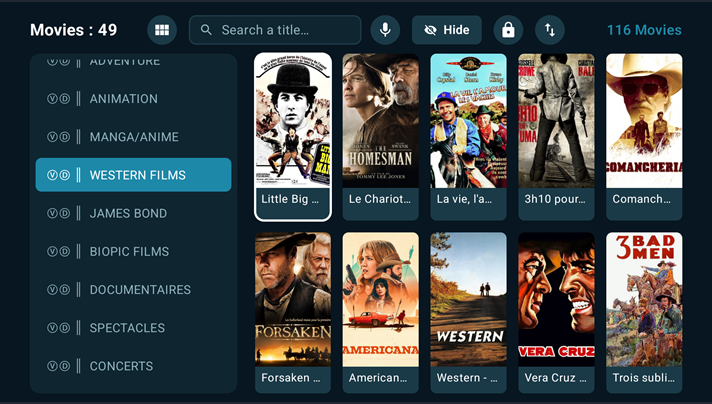
TiviMate provides a TV-oriented interface that makes browsing channels straightforward.
The layout can be customized to suit different viewing preferences, which is particularly useful when working with large channel lists.
2. M3U Playlist Support
TiviMate supports M3U playlists, one of the most commonly used formats for IPTV playlists.
Once an authorized playlist has been added, the application can organize the available channels into groups.
3. Xtream Codes Support
TiviMate also supports Xtream Codes-based playlist configuration.
This can make setup easier when a legitimate IPTV service provides the necessary server information and account credentials.
4. Stalker Portal Support
Another supported option is Stalker Portal.
This gives users additional flexibility when their authorized IPTV source uses this type of platform.
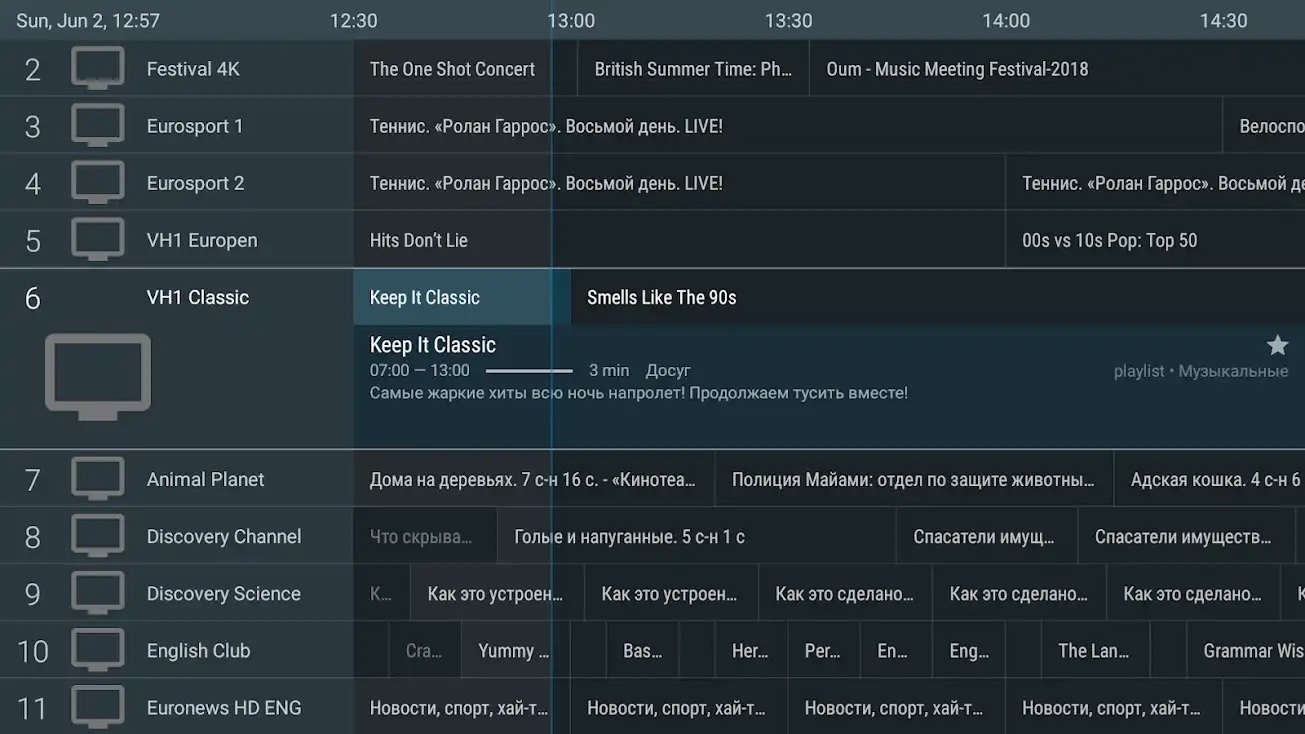
5. Electronic Program Guide (EPG)
The EPG, or Electronic Program Guide, is one of TiviMate’s most useful features.
Instead of simply displaying a list of channels, an EPG can show programme information and schedules in a familiar TV-guide format.
This makes it much easier to see what is currently playing and what is coming next.
6. Multiple Playlists
TiviMate can manage multiple playlists, allowing users to switch between different authorized sources without having to completely reconfigure the application.
This is particularly useful for people who have separate playlists for different types of content.
7. Favorites
Large IPTV playlists can contain thousands of channels.
The favorites feature allows frequently watched channels to be kept in one convenient location, reducing the amount of scrolling required.
8. Search
TiviMate includes search functionality for finding channels and programmes more quickly.
This becomes increasingly useful as the size of a playlist grows.
9. Catch-Up
Where the content source supports it, TiviMate can provide access to previously broadcast programmes through its catch-up functionality.
This means users don’t necessarily have to watch everything live.
The availability of catch-up depends on the playlist and service providing the content.
10. Recording
TiviMate also supports recording compatible streams.
This allows supported programmes to be recorded for later viewing, subject to the capabilities of the content source and available storage.
11. Multiview
One particularly interesting feature is Multiview.
It allows compatible channels to be displayed simultaneously on the same screen.
This can be useful when following several live broadcasts at once.
12. Parental Controls
TiviMate includes parental-control functionality that can be used to restrict access to selected content or areas of the application.
Is TiviMate Available on Android TV?
Yes.
TiviMate is specifically designed for Android TV and remote-controlled television devices. The current Google Play listing states that it is not optimized for touch devices such as phones and tablets.
This TV-first approach is one of the main differences between TiviMate and many other IPTV applications.
It works particularly well with devices such as compatible Android TV televisions and Android TV streaming boxes.
TiviMate Free vs Premium
TiviMate offers a free version as well as premium functionality.
The important thing to understand is that TiviMate Premium is an upgrade to the application itself. It does not include IPTV channels or an IPTV subscription.
In other words:
TiviMate Premium ≠ IPTV subscription
The premium version unlocks additional application features, while the actual content comes from the user’s own compatible source. The current Google Play listing explicitly states that paid upgrades do not include channels, streams or media content.
Does TiviMate Provide IPTV Channels?
No.
TiviMate is an IPTV player, not an IPTV channel provider.
You need to supply a compatible playlist or media source. Users should only use content that they are legally authorized to access.
This distinction is important because searching for “TiviMate channels” can sometimes create confusion between the application and third-party IPTV services.
Is TiviMate Legal?
TiviMate itself is a media player.
The legality of what you watch depends on the content source and whether you have authorization to access that content.
Using the application to play legitimate IPTV streams is different from accessing copyrighted content without permission.
For that reason, always use authorized content sources.
TiviMate vs Other IPTV Players
TiviMate’s main strength is its TV-focused design.
Compared with simpler IPTV players, it offers a more complete television experience with features such as:
- EPG
- Multiple playlists
- Favorites
- Search
- Catch-up
- Recording
- Multiview
- Parental controls
- Customizable interface
This makes it particularly attractive to users who want their IPTV playlist to behave more like a traditional television service.
How to Get the Best Experience With TiviMate
A good IPTV player cannot compensate for an unreliable Internet connection or poor-quality streaming source.
For a smoother experience:
Use a stable Internet connection
A stable connection is generally more important than simply having a very high maximum speed.
Use Ethernet when possible
For a fixed Android TV device, Ethernet can provide a more consistent connection than Wi-Fi, especially in environments with congestion or weak wireless coverage.
Keep your playlist organized
Large playlists are easier to navigate when channels are properly categorized and frequently watched channels are added to favorites.
Make sure your EPG is configured correctly
If programme information is missing or incorrect, the issue may be related to the EPG data supplied by the content source rather than the player itself.
Keep enough storage available
If you use recording features, make sure the device has sufficient available storage.
Frequently Asked Questions
What is TiviMate?
TiviMate is an IPTV media player designed primarily for Android TV and compatible television devices.
Does TiviMate come with IPTV channels?
No. TiviMate does not provide channels or IPTV subscriptions. Users add their own compatible content sources.
Does TiviMate support M3U?
Yes. TiviMate supports M3U playlists.
Does TiviMate support Xtream Codes?
Yes. Xtream Codes is one of the playlist formats supported by the current version of TiviMate.
Does TiviMate support EPG?
Yes. TiviMate supports an Electronic Program Guide for compatible content sources.
Can TiviMate record TV?
Yes, TiviMate supports recording compatible content, subject to the capabilities of the source and device.
Does TiviMate work on phones?
TiviMate is designed primarily for Android TV and remote-controlled devices and is not optimized for touch devices such as phones and tablets.
Does TiviMate Premium include an IPTV subscription?
No. Premium unlocks application functionality; it does not provide channels or IPTV streams.
Final Verdict
TiviMate is one of the more feature-rich IPTV players for Android TV users.
Its strongest points are its TV-friendly interface, playlist management, EPG, favorites, search, catch-up, recording and Multiview features.
The application is particularly well suited to users who already have legitimate IPTV playlists and want a cleaner and more traditional television-style interface.
The key thing to remember is simple: TiviMate is the player, not the IPTV service.
The application provides the interface and playback features, while the content comes from the playlist or service configured by the user.
If your priority is a polished IPTV experience on Android TV, with strong playlist management and advanced TV features, TiviMate is certainly an application worth considering.



Leave a Reply