

XCIPTV Player: Complete Guide, Features, Compatibility and Setup
XCIPTV Player is an IPTV media player designed to give users a simple way to organize and watch compatible live TV, movies and series on supported devices.
Like other IPTV players, XCIPTV does not act as a television channel provider. Instead, it provides the interface and playback tools needed to use a compatible IPTV playlist or service.
With features such as EPG support, multiple profiles, parental controls, favorites and VOD organization, XCIPTV can be a convenient choice for users who want a straightforward IPTV experience.
What Is XCIPTV Player?
XCIPTV Player is an IPTV application designed for streaming content from compatible IPTV services and playlists.
The application itself does not normally supply television channels. Instead, users connect their own IPTV service or authorized playlist to access the content available through that source.
This distinction is important because XCIPTV is a player, not an IPTV subscription.
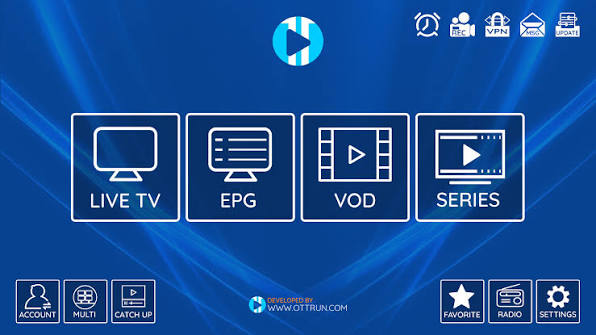
Once configured, the application can organize available content into sections such as:
- Live TV
- Movies
- TV series
- Favorites
- Electronic Program Guide (EPG)
- Catch-up, when supported
- Radio, depending on the source
The exact features and content available can depend on the version of XCIPTV and the IPTV service being used.
Why Do People Use XCIPTV?
One of XCIPTV’s main advantages is simplicity.
The application is designed around IPTV rather than general-purpose media playback. This makes it easier to browse large channel lists and VOD libraries when the connected service provides the necessary information.
Its interface is also designed with television navigation in mind, making it suitable for users who prefer controlling their IPTV service with a remote.
XCIPTV Features
1. Live TV
XCIPTV can organize live television channels into groups supplied by the IPTV source.
Instead of navigating through an unorganized list, users can browse categories and quickly find the channels they want to watch.
The available channels depend entirely on the IPTV service or playlist connected to the application.
2. Electronic Program Guide
The Electronic Program Guide (EPG) is an important feature for IPTV users.
When EPG information is provided by the IPTV service, XCIPTV can display programme schedules and information in a traditional TV-guide format.
This makes it easier to see what is currently playing and what is scheduled next.
3. Movies and VOD
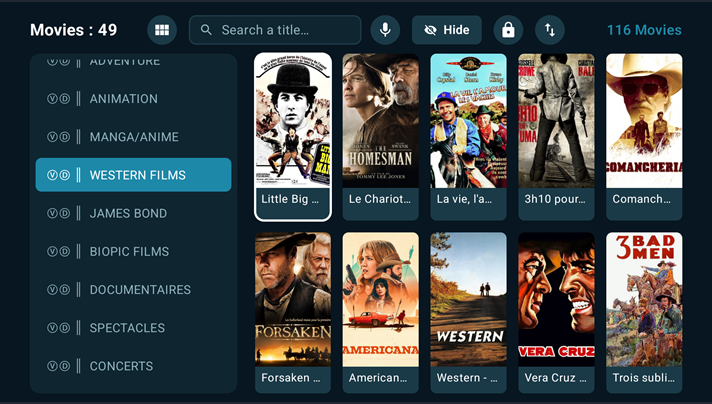
XCIPTV can organize compatible Video on Demand (VOD) content into a library-style interface.
Depending on the information supplied by the IPTV service, movies can appear with titles, categories, posters and additional information.
4. TV Series
For IPTV services that provide series information, XCIPTV can organize episodes into a structured catalogue.
This is much more convenient than navigating through individual video links.
5. Favorites
Users can add frequently watched channels to their favorites.
This is particularly useful when an IPTV service contains a very large number of channels.
Instead of scrolling through the entire list every time, frequently used channels can be accessed from a dedicated favorites section.
6. Multiple Profiles
XCIPTV supports multiple profiles in compatible versions.
This can be useful when several people use the same device but prefer separate favorites or viewing configurations.
7. Parental Controls
Parental-control functionality can help restrict access to selected content.
This is useful when the application is installed on a family television and different users have access to the same IPTV service.
8. Catch-Up
Some IPTV services provide previously broadcast programmes through catch-up functionality.
When the connected source supports this feature, compatible content can be accessed after its original broadcast.
The availability of catch-up is determined largely by the IPTV service and its server configuration.
9. External Player Support
Depending on the XCIPTV version and platform, users may have options for playback through compatible external media players.
This can be useful when a particular stream works better with a different playback engine.
XCIPTV Supported Devices
XCIPTV has primarily been associated with Android-based devices, including Android TV and TV boxes.
Depending on the current application version and distribution channel, availability may vary between devices and regions.
Commonly associated platforms include:
- Android TV
- Android TV boxes
- Android smartphones
- Android tablets
- Fire TV-compatible Android devices
Before installing the application, it is always worth checking whether your particular device and operating-system version are supported.
XCIPTV on Android TV
Android TV is one of the most natural environments for XCIPTV.
The large-screen interface makes it possible to browse live channels, VOD content and programme information using a television remote.
For users with a large IPTV playlist, a dedicated TV interface can be much more convenient than using a browser or mobile-oriented application.
XCIPTV on Fire TV
XCIPTV can also be used on compatible Fire TV devices where the appropriate application version is available.
Because Fire TV devices are designed for television use, an IPTV application such as XCIPTV can provide a convenient interface for accessing a user’s authorized streaming sources.
Compatibility can vary, so users should verify the current availability for their particular Fire TV model.
How Does XCIPTV Work?
The basic process is relatively straightforward.
First, install the compatible XCIPTV application on your supported device.
Next, provide the connection details supplied by your authorized IPTV service.
Depending on the service and application version, this may involve information such as:
- Username
- Password
- Server URL
- Playlist information
After the connection is configured, XCIPTV retrieves the available channel and VOD information from the source.
The application then organizes the content into its various sections.
Important distinction
XCIPTV does not automatically create channels or provide an IPTV subscription.
The application is simply the player used to access compatible content from the source you configure.
Does XCIPTV Provide IPTV Channels?
No.
XCIPTV is an IPTV player.
It does not itself provide a television channel package or automatically give users access to premium channels.
Users need a compatible content source and should only use services and streams they are legally authorized to access.
This is an important distinction between an IPTV player and an IPTV provider.
Is XCIPTV Free?
XCIPTV availability and pricing can depend on the version and platform.
The application should be obtained through a legitimate distribution channel whenever possible.
Users should also be careful with websites offering modified versions of IPTV applications, as unofficial APK files can potentially contain unwanted or malicious software.
For security, downloading applications from trustworthy sources is strongly recommended.
Is XCIPTV Legal?
XCIPTV is a media-player application.
The legality of IPTV streaming depends on the content being accessed and whether the user has permission to access it.
Using XCIPTV with legitimate and authorized content is different from accessing copyrighted channels or movies without authorization.
Therefore, users should always verify that their IPTV provider or playlist has the appropriate rights to distribute the content.
XCIPTV vs TiviMate
XCIPTV and TiviMate are both popular choices for IPTV playback, but they approach the user experience somewhat differently.
TiviMate is particularly well known for its highly customizable TV interface and advanced playlist-management features.
XCIPTV focuses more on providing a straightforward IPTV experience with features such as Live TV, VOD, EPG and favorites.
For users who want extensive interface customization, TiviMate may be more attractive.
For someone looking for a simpler IPTV application, XCIPTV can be a good alternative.
XCIPTV vs IPTV Smarters Pro
XCIPTV and IPTV Smarters Pro share several similarities.
Both applications can organize IPTV content into categories such as Live TV, movies and series, while supporting features such as EPG and favorites.
The main differences are generally related to interface design, supported platforms and individual features.
The best choice depends on the device being used and the type of IPTV source being connected.
Tips for a Better XCIPTV Experience
Use a stable connection
Streaming quality depends heavily on network stability.
If possible, connect a fixed TV device through Ethernet for a more consistent connection.
Keep the application updated
Using a current version can help with compatibility and stability.
Keep your playlist organized
Large IPTV services can contain thousands of channels. Favorites and categories can make navigation much easier.
Check EPG data
If programme information is missing, the problem may originate from the IPTV source rather than XCIPTV.
Avoid unknown APK websites
Unofficial APK files can carry security risks. Whenever possible, use trusted and legitimate application sources.
Common XCIPTV Problems
XCIPTV keeps buffering
Buffering can be caused by several factors, including:
- Internet instability
- Wi-Fi interference
- High server load
- Poor-quality streaming sources
- Device limitations
It is therefore important to determine whether the problem affects one channel or the entire service.
EPG is not working
If the channels appear correctly but the programme guide is empty, the EPG information supplied by the IPTV source may be missing or incorrectly configured.
Some channels do not play
If only certain streams fail while others work normally, the issue may be related to the source server or individual streams rather than the application.
XCIPTV is slow
Large playlists can sometimes take longer to load, particularly on lower-powered Android TV devices.
Reducing unnecessary playlist content and keeping the device’s software updated may help.
Frequently Asked Questions
What is XCIPTV Player?
XCIPTV Player is an IPTV media-player application that allows users to access compatible IPTV playlists and streaming services on supported devices.
Does XCIPTV come with channels?
No. XCIPTV is a player and does not itself provide IPTV channels or subscriptions.
Does XCIPTV support EPG?
Yes. XCIPTV can display Electronic Program Guide information when it is provided by the compatible IPTV source.
Can I use XCIPTV on Android TV?
Yes. XCIPTV is commonly used on compatible Android TV devices and Android TV boxes.
Does XCIPTV work with IPTV subscriptions?
It can work with compatible IPTV services, provided the service uses a supported connection method and the user is authorized to access the content.
Can XCIPTV play movies and series?
Yes. Compatible VOD and series content can be organized and played when provided by the connected IPTV source.
Is XCIPTV better than TiviMate?
There is no universal winner. TiviMate is particularly attractive for users who want extensive customization and advanced TV-focused playlist management, while XCIPTV offers a straightforward IPTV experience.
Does XCIPTV provide an IPTV subscription?
No. XCIPTV and the IPTV subscription are separate. The application is used to play content supplied by the user’s authorized source.
Final Verdict
XCIPTV Player is a practical IPTV application for users who want a straightforward way to manage Live TV, VOD, series and EPG information on compatible Android-based devices.
Its simple interface, favorites, programme guide, VOD organization and IPTV-focused design make it a useful alternative to other popular IPTV players.
However, XCIPTV should not be confused with an IPTV provider. The application is the player; the content comes from the configured source.
For the best experience, use a reliable Internet connection, a compatible device and a legitimate IPTV service.
If you are comparing IPTV players, XCIPTV is worth considering alongside applications such as TiviMate and IPTV Smarters Pro, particularly if you prefer a simple interface and primarily watch IPTV on Android TV or a compatible streaming device.



Leave a Reply